- Product

- Pricing
- Affiliate Program
- Use Cases
- Resource
 EN
EN
TikTok is one of the most popular social media platforms globally, with over a billion active users engaging daily. Its short-form videos, algorithm-driven content recommendations, and viral trends make it highly addictive and widely used across all age groups.
However, as user engagement increases, so does the concern about online privacy. Many users are now asking: Is it possible to be a TikTok anonymous user? And if so, how can you truly view TikTok anonymously without compromising your digital footprint?
TikTok's wide user base means it collects enormous amounts of user data, including location, behavior patterns, and device information. These insights feed its algorithm, offering hyper-targeted content but also raising significant privacy concerns.
According to TikTok's updated 2026 terms of service, the platform now explicitly collects both approximate and precise location data, marking a significant shift from IP-based location tracking. The new policy, implemented under TikTok USDS Joint Venture in the US, expands data collection permissions for AI algorithm training and cross-platform advertising. Additionally, TikTok confirmed that its direct messages use standard encryption (similar to Gmail) rather than end-to-end encryption, allowing authorized access for safety investigations and legal compliance—a deliberate design choice to prevent illegal content sharing on the platform.
Staying tiktok anonymously can protect you from potential data leaks, intrusive ads, or algorithmic profiling. It also minimizes the risks of being tracked through your IP address or phone number, especially when using TikTok on public or shared devices. In sensitive professions or countries with strict surveillance laws, the need to watch TikTok anonymously may even be a matter of safety.
If you want to watch TikTok anonymously or engage with content without exposing your identity, here are a few ways to do that. Combining several of these methods gives you the highest degree of anonymity.
Using a temporary or anonymous email helps keep your primary identity detached from the TikTok account. It's a simple yet effective way to set up an anonymous TikTok profile.
2026 Note: Some temporary email domains are increasingly blacklisted by major platforms. For better account longevity, consider using semi-permanent anonymous email services like ProtonMail or Tutanota that don't require personal verification information while offering more stable domain reputations.
Pros:
Keeps your personal email unlinked
Easy to set up
Disposable when no longer needed
Cons:
May be less secure than regular emails
Some platforms may block temporary domains
Recommended Tools: TempMail, EmailOnDeck, Guerrilla Mail
Steps:
Visit a temporary email provider
Copy the generated email
Use it to sign up for TikTok
A VPN masks your IP address and encrypts your internet traffic, making it harder for TikTok to identify your location or device.
Pros:
Hides real IP and location
Encrypts your data
Enables access to content from different regions
Cons:
Some free VPNs are unreliable
May slow down connection speed
Trusted VPNs: NordVPN, ExpressVPN, ProtonVPN
Steps:
Download a VPN app
Connect to a secure server
Open TikTok and browse with more privacy
VPNs are especially useful if you want to view TikTok stories anonymously or bypass geo-restrictions that limit content availability.
MoreLogin is a browser environment manager that helps you operate multiple anonymous TikTok accounts safely. It creates unique browser fingerprints for each account, preventing detection and bans.
Pros:
Creates isolated browser profiles
Avoids fingerprint tracking
Supports multiple accounts
Cons:
The free version has limited features
Paid plans are needed for full access
Steps:
Download MoreLogin
Create a new browser profile
Sign up for TikTok within the profile
Whether you're an advertiser, creator, or viewer, MoreLogin helps you watch TikTok anonymously and test strategies without revealing your real identity.
A proxy server acts as a middleman between your device and TikTok, masking your real IP address and location.
Pros:
Adds a layer of anonymity
Helpful for managing multiple accounts
Cons:
Setup can be complex
Free proxies may not be reliable
Tips:
Choose a reputable residential proxy service
Avoid public proxies that may expose your data
Use alongside MoreLogin or a VPN for maximum protection
In 2026, TikTok has enhanced its tracking capabilities beyond simple cookies. While you can still browse TikTok's web version without an account, the platform now uses tracking pixels embedded on third-party websites to follow your activity across the internet—even if you've never created a TikTok account. Browser-only viewing provides basic anonymity for casual browsing but does not prevent device fingerprinting or behavioral profiling. To truly remain anonymous, you must combine broswer-based viewing with tools that mask your IP and device fingerprint.
Even after account creation, there are steps you can take to view TikTok anonymously and keep your profile hidden from both TikTok and other users.
TikTok does NOT offer an official anonymous mode for viewing Stories. Whenever you watch someone's TikTok Story, your username will appear in their viewer list, even if your account is private or profile view history is disabled. Third-party tools claiming to provide anonymous Story viewing are unreliable and may compromise your data. The safest approach for anonymous Story viewing is to use a secondary account with no connection to your real identity.
TikTok provides privacy controls that can restrict who sees your activity. These settings are essential if you wish to use the platform anonymously.
Launch the TikTok app on your mobile device.
Make sure you're logged into your account.
Tap the profile icon at the bottom right corner of the screen.
Tap the three-line menu icon (≡) at the top right.
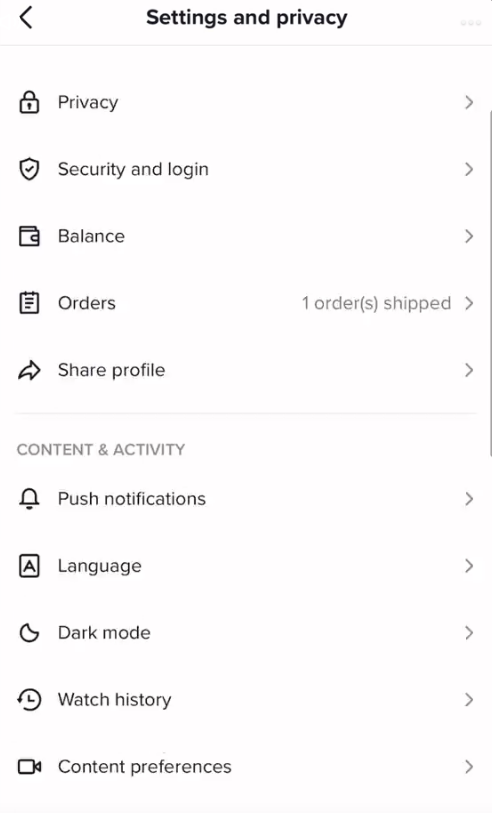
Select “Settings and privacy” from the menu.
Tap “Privacy” under the “Account” section.
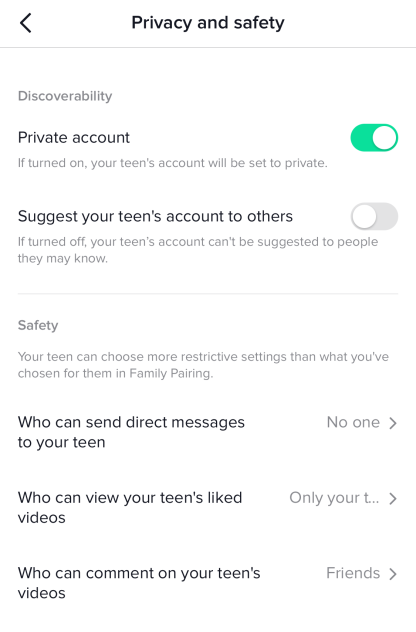
1. Toggle on “Private account” to allow only approved followers to view your content.
2. Turn “Activity Status” on or off. If off, others won’t see when you're active.
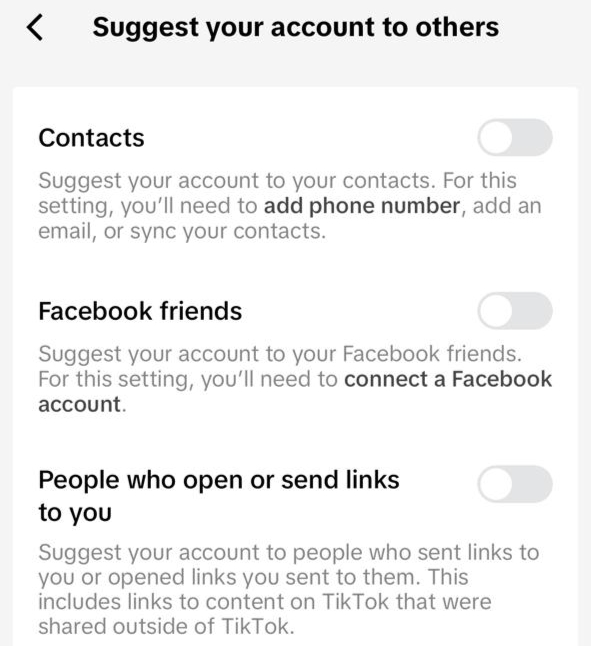
3. You can turn off the “Suggest your account to others” option.
Contacts
Facebook friends
People who open or send links to you
4. Control who can interact with your content:
Comments: Set to “Everyone,” “Followers,” or “No one.”
Mentions & tags: Restrict who can tag or mention you.
Duet and Stitch: Choose who can use your videos for Duet or Stitch.
These steps help reduce your visibility on the platform, giving you more control over your TikTok anonymous experience.
TikTok's Profile View History feature allows users aged 16+ with fewer than 5,000 followers to see who visited their profile in the past 30 days. However, this feature works on a mutual basis—both parties must have Profile View History enabled for visibility to work. If you disable this setting, your profile visits will remain completely private, and you won't be able to see who viewed your profile either. This is one of the most effective native privacy controls for anonymous browsing.
Under TikTok's 2026 updated terms, the platform can now collect precise GPS location data beyond approximate IP-based location. To protect your privacy:
On iOS: Go to Settings > Privacy & Security > Location Services > TikTok > Select 'Never' and disable 'Precise Location'
On Android: Go to Settings > Apps > TikTok > Permissions > Location > Set to 'Deny' or 'Allow only while using'
Important: Even with permissions restricted, TikTok may still infer location through network data, device information, and behavioral patterns. Consider combining device-level restrictions with proxy services for maximum protection.
You need to avoid using your real name, location, or personal identifiers in:
Bio
Video content
Comments
Even seemingly harmless posts can reveal personal details. For example, a background landmark or regional slang can expose your location.
Linking your Instagram, YouTube, or Facebook accounts makes it easier for TikTok and others to trace your real identity. For TikTok anonymous use, avoid connecting any external social media accounts.
Tip: If you must link accounts for business purposes, use separate ones with no personal information.
While TikTok may prompt you to add a phone number for security, doing so links your account to your real identity and mobile carrier data.
Risks:
Data breach exposure
Easier account tracking
Can link to real-world identity through telecom providers
Alternative: Use an email-only registration or a virtual number service like TextNow or Google Voice.
TikTok's algorithm underwent significant updates in 2026 that affect anonymous users:
Follower-First Testing: New videos are now primarily shown to existing followers first, with broader distribution depending on follower engagement. This means anonymous accounts with few followers receive limited initial reach.
Search-Based Discovery: With 40% of Gen Z using TikTok as a search engine, the platform now prioritizes content that answers specific queries. Videos optimized with keywords in captions, on-screen text, and audio get higher visibility in search results.
Deep Engagement Priority: The algorithm now weighs saves, shares, and comments more heavily than simple likes. Re-watch rates and completion rates (targeting 70%+) are the strongest signals for content distribution.
These changes make it harder for anonymous accounts to gain organic reach, emphasizing the need for strategic content planning and engagement tactics.
In TikTok v43.7.3+, if both you and the viewer have "Viewer History" disabled in Privacy settings, neither party can see who viewed their profile or videos. However, likes and comments are always visible.
Yes. TikTok collects your IP address, device information, browser type, and viewing behavior even without an account. Use Guest Mode combined with a VPN and MoreLogin for comprehensive protection.
TikTok doesn't have an official "incognito mode." For true incognito browsing, use TikTok's web version in a private browser window, disable Viewer History in settings, and layer with a VPN for IP masking.
Anonymous TikTok Live viewing is limited. In some 2026 builds, your name still appears when entering live streams. For complete anonymity during Lives, use TikTok's desktop website while logged out.
No. Profile View History only controls profile and video view visibility to other users. TikTok still tracks your watch time, engagement patterns, and interests for algorithm optimization and ad targeting.
For casual viewers: Disable Viewer History + use Guest Mode. For complete anonymity: Use MoreLogin with integrated proxy + privacy browser + VPN combination.
Using TikTok anonymously can significantly boost your online privacy. From choosing a VPN or proxy to tools like MoreLogin and email obfuscation, there are multiple ways to protect your identity and watch TikTok anonymously. Whether you're a casual viewer, content creator, or digital marketer, maintaining control over your data is crucial in today’s digital world.
The digital space shouldn’t cost you your privacy. Want to safely manage multiple TikTok accounts or avoid shadowbans? Learn how to avoid TikTok ad bans. Get started with MoreLogin and take back control of your anonymous experience on TikTok.
 EN
EN